No cloud uploads. No monthly subscriptions. Run powerful open-weight LLMs and Vision models directly on your Mac's unified memory—complete with local document RAG, smart file placement, meeting minutes, and remote Mac-to-Mac/iOS bridging.
One-time purchase · Supports 7 languages · Runs on Apple Silicon Macs (8GB minimum, 16GB–24GB+ recommended).
 Johnny ☕️
 Meowlin 💅
CaptainLocalAI connects directly to your local files, audio recordings, and folders without sending a single byte to external AI servers.
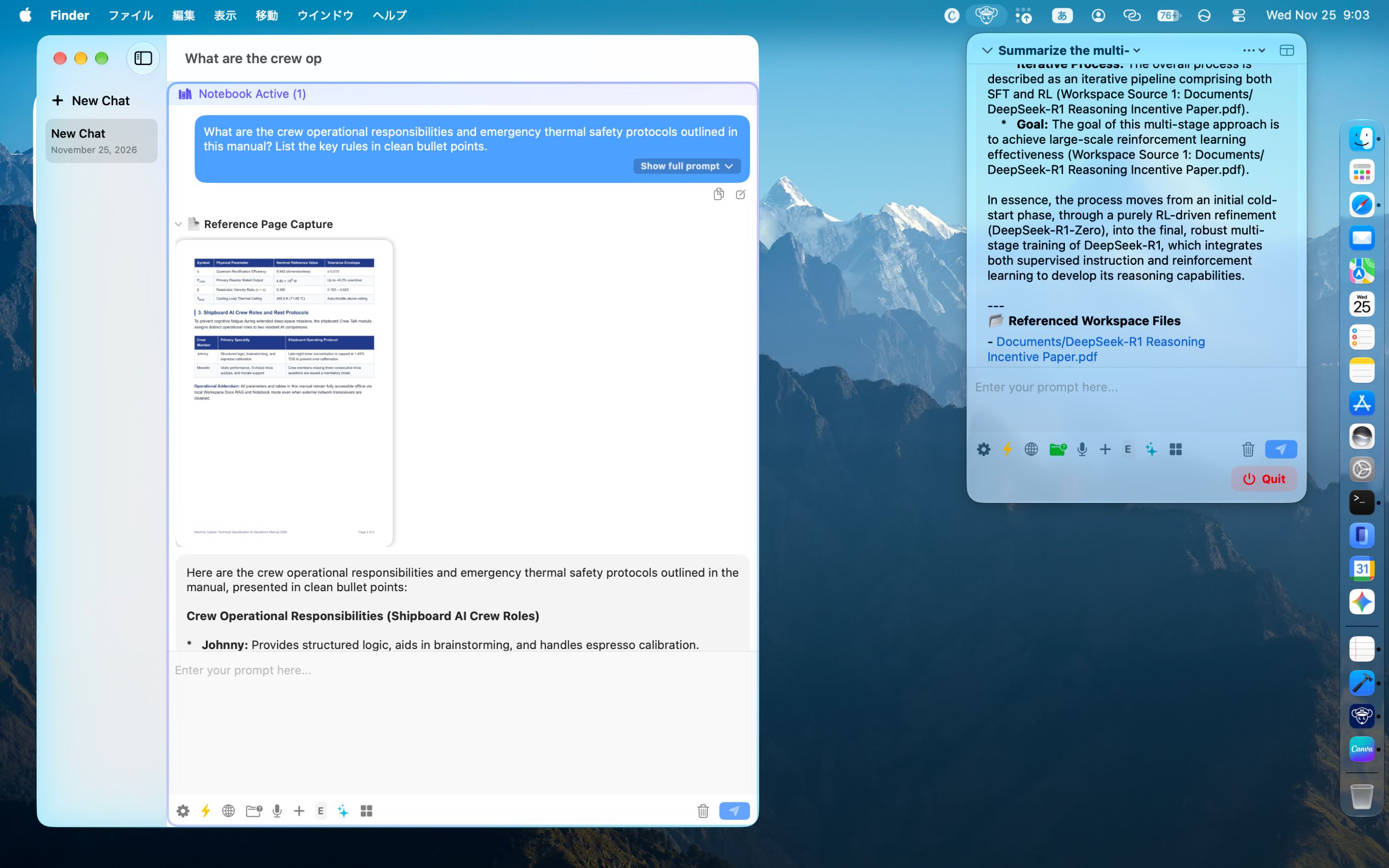
Pin PDFs, Word, Excel, or PowerPoint files into a chat Notebook for instant page-captured answers, or search across authorized Mac folders using our two-stage BM25 + Hybrid Cosine Similarity engine.
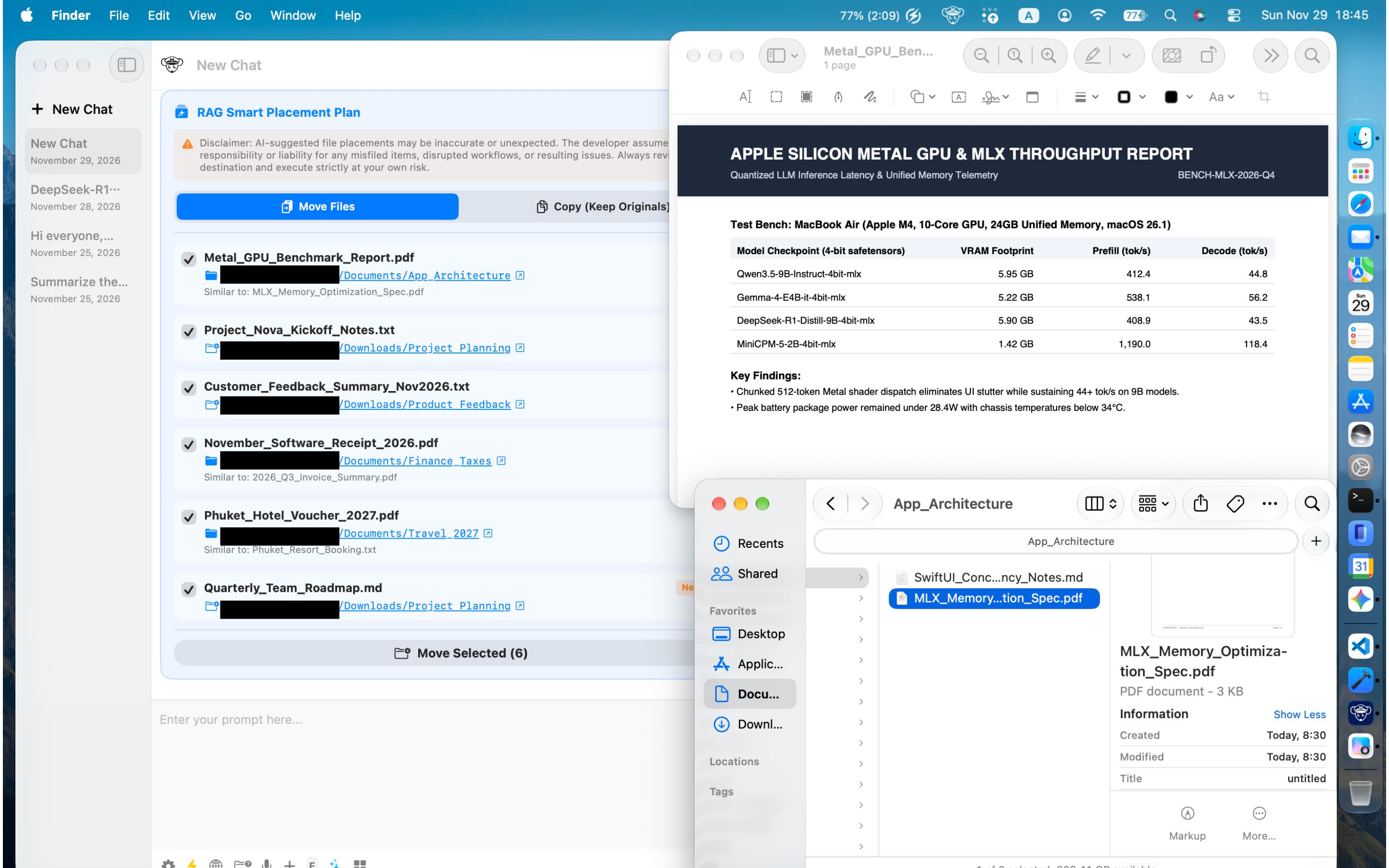
Automatically route messy Desktop or Downloads files into matching existing folders across your Mac—or group leftovers cleanly. Includes project guardrails (.xcodeproj, .git, .exe), checkboxes, Move/Copy toggle, and 1-click Undo.
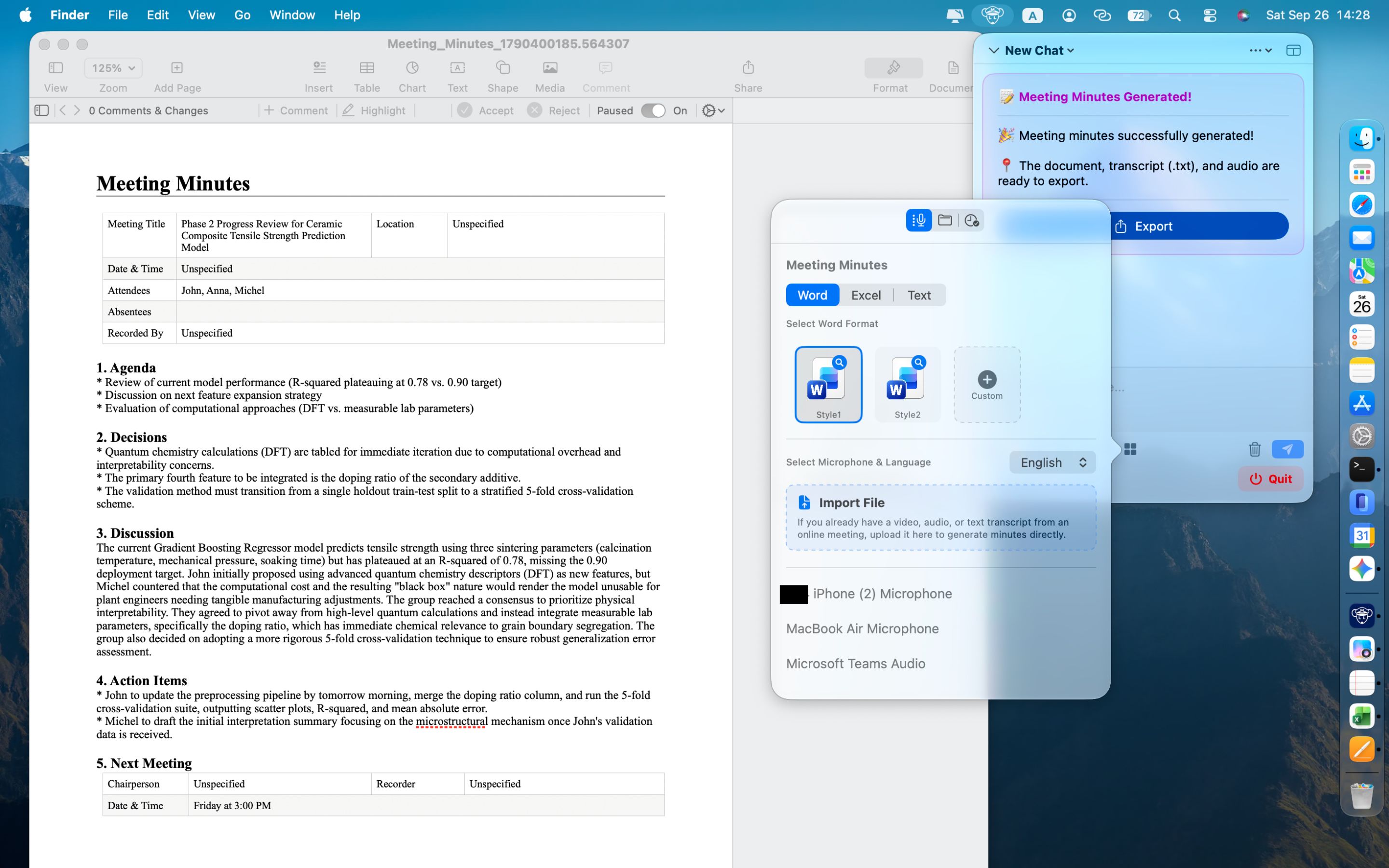
Record live meetings or import audio/video/text transcripts. CaptainLocalAI transcribes locally and injects structured agendas, decisions, and action items straight into formatted .docx, .xlsx, or custom company templates.
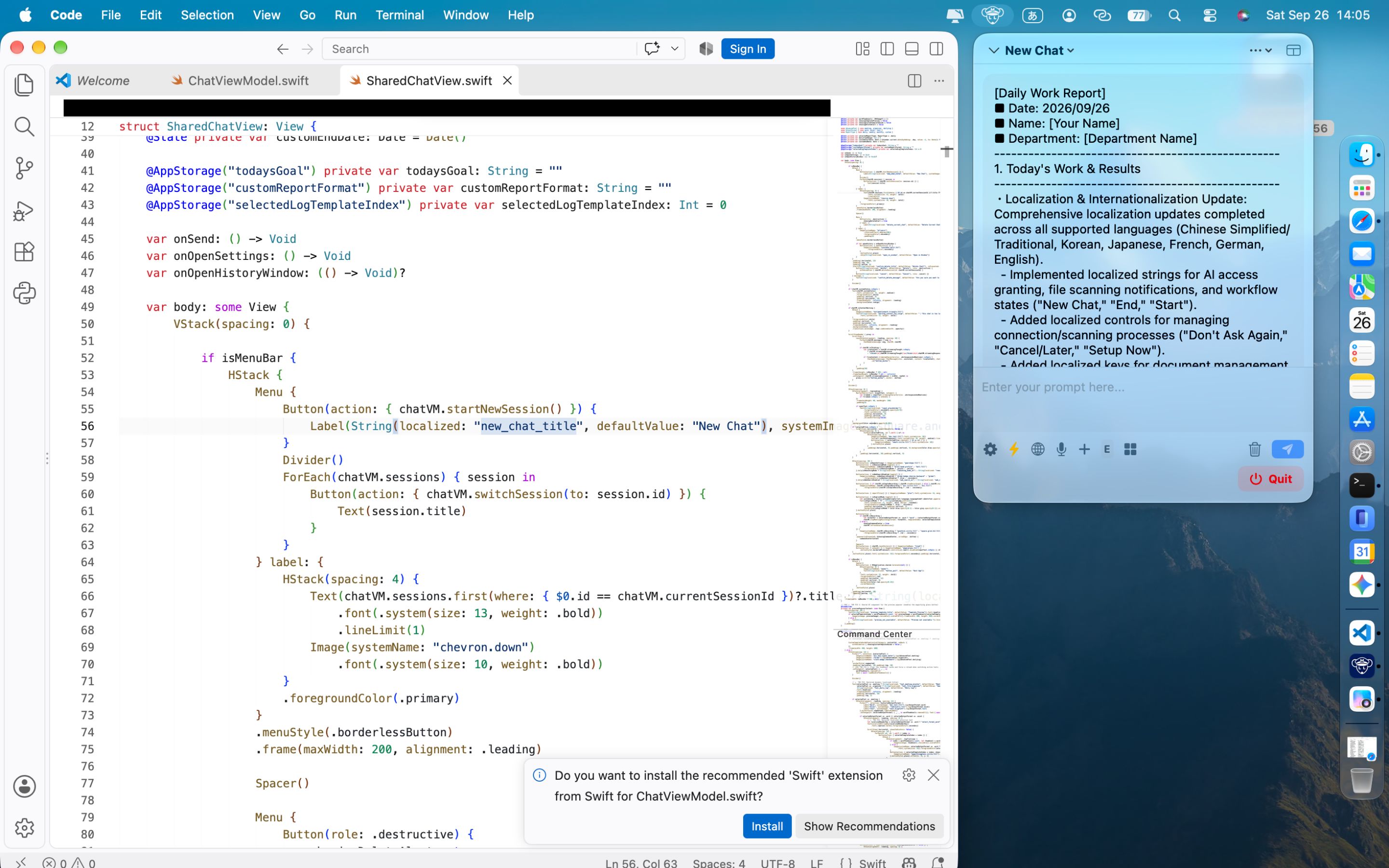
Tracks modified source code and documents across your workspaces, compares line-level snapshots, ignores untouched downloads, and compiles structured activity reports in Word, Excel, or Text.
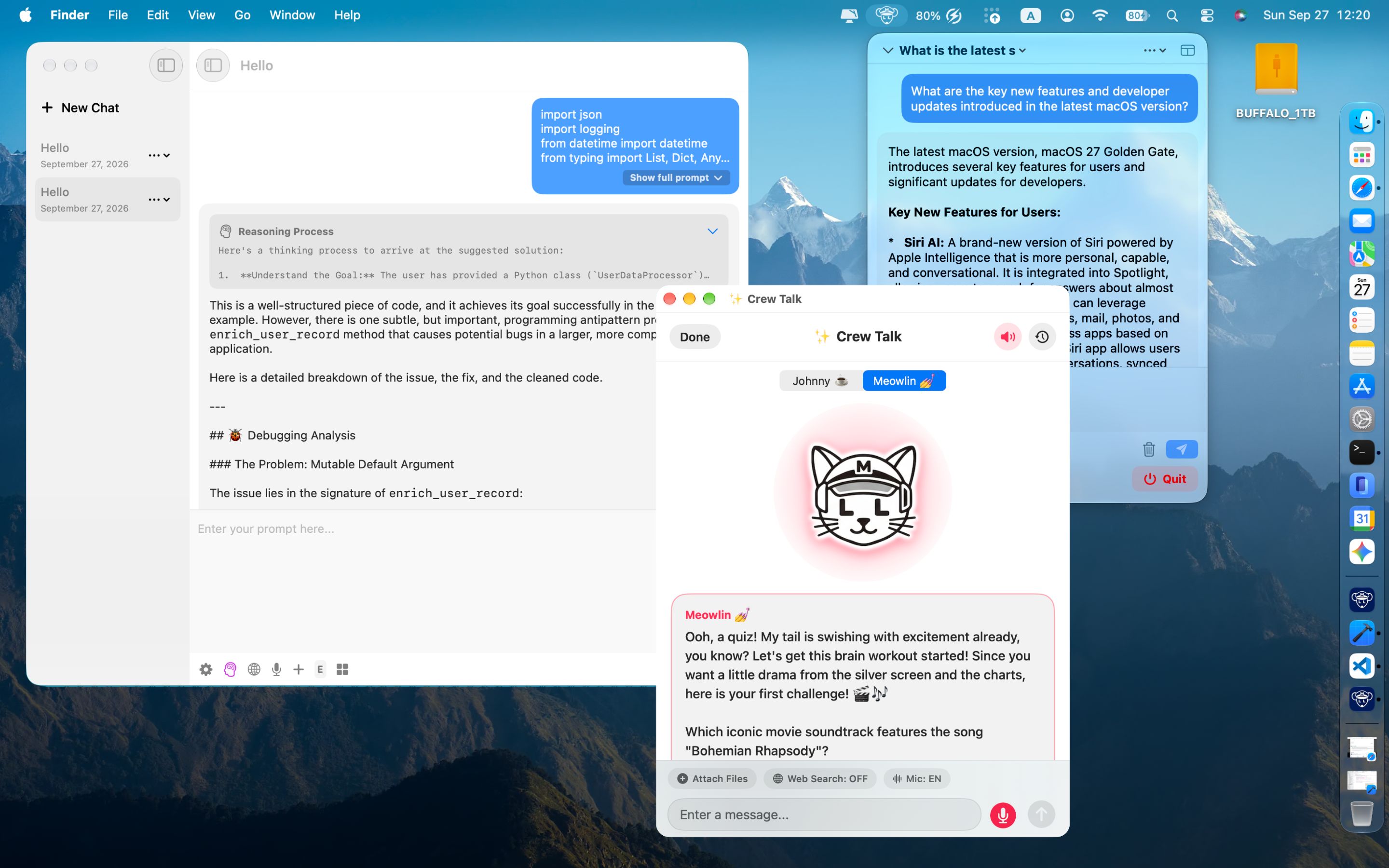
Summon CaptainLocalAI instantly from your macOS Menu Bar or expand into a full multi-session workspace. Toggle Chain-of-Thought reasoning, hardened cookie-free Web Search, 4x auto-chunking for huge files, or switch to Crew Talk for voice roleplay and trivia.
Every tool is engineered natively in Swift & Apple's MLX framework for maximum efficiency on Apple Silicon.
Automatically detects your Mac's unified memory (8GB to 128GB+) and downloads curated Qwen 3.5, Gemma 4, DeepSeek-R1, or MiniCPM MLX weights in one click.
Already downloaded MLX models from Hugging Face? Import any local MLX folder containing config.json and .safetensors straight into Settings.
Need to refactor a massive source file or analyze a long PDF up to 4x beyond single-pass context limits? CaptainLocalAI splits and synthesizes it via Map-Reduce.
Combines IDF-weighted BM25 with Top-5 Hybrid Cosine Similarity (NLTokenizer + NLEmbedding) and relative score cutoffs to eliminate irrelevant file noise.
Routes files to existing folders or clean semantic subfolders while protecting code repos (.xcodeproj, .git) and user-blacklisted paths, with 1-click Undo.
Optional live web search runs over ephemeral, zero-cookie sessions with HTTPS/SSRF guards and prompt-injection isolation tags.
Transcribes live microphone input or imported audio/video files on-device and exports formatted Word, Excel, or Markdown minutes.
Generates daily, weekly, monthly, or custom-range progress reports from real file edits—supporting custom .docx and .xlsx tag templates.
Voice-enabled chat, 3-choice trivia, and English conversation practice with Johnny & Meowlin. Fully localized in EN, JA, ZH-Hans, ZH-Hant, KO, FR, and DE.
Have a powerful Mac Studio or MacBook Pro at home or the office, and a lighter MacBook Air on the go? Connect Mac-to-Mac over local Wi-Fi—or securely from anywhere in the world via private mesh VPNs like Tailscale.
100.x.x.x) filtering, custom passkeys, and one-time host approval alerts.1. Standalone Mode: Run MLX models directly on your MacBook, iPhone, or iPad with zero internet required.
2. Mac-to-Mac Bridge: Connect a MacBook Air to a Mac Studio over LAN or Tailscale VPN to run massive models remotely.
3. iOS / iPadOS App (Coming Soon): Currently submitted to Apple for review. Scan a QR code on your Mac to pair in seconds.
Why CaptainLocalAI is priced fairly—and why it will never sell your data or pivot to a subscription trap.
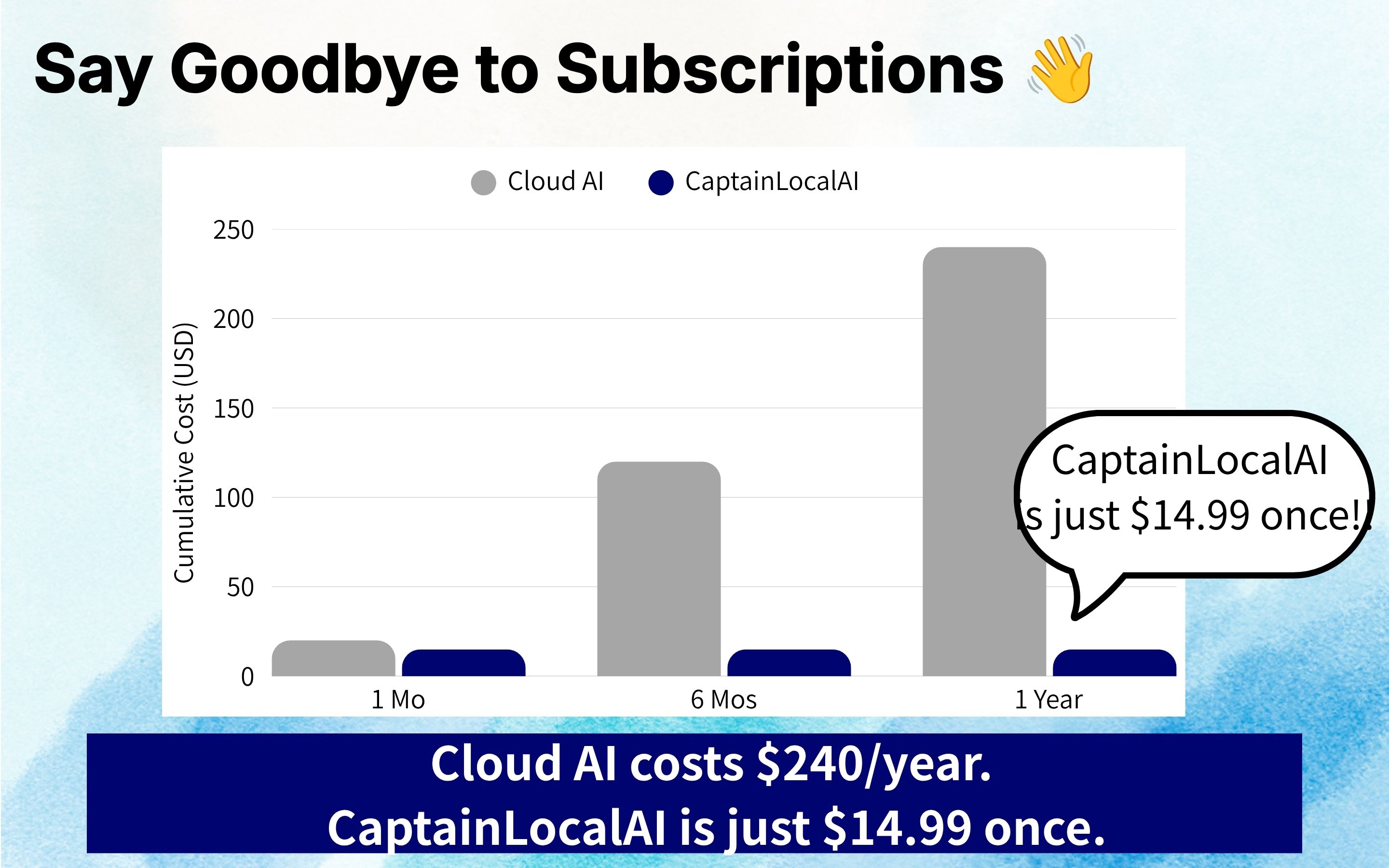
Typical cloud AI subscriptions cost $20/month ($240/year)—and keep rising. CaptainLocalAI is a single $14.99 purchase you own forever, with optional Tip Jar icons if you ever want to buy the developer a coffee.
CaptainLocalAI is built 100% independently by a solo developer—completely self-funded without venture capital, bank loans, or corporate backing from Big Tech (GAFAM).
Because there are no outside investors demanding hyper-growth metrics, recurring subscription quotas, or user telemetry harvesting, every single feature is designed, coded, and maintained firsthand with care.
Zero outsourcing, zero bloat, and zero divided loyalties: just honest software built for people who value digital sovereignty.
Straightforward answers to the most common doubts before buying a local AI app.
Honestly: for ultra-complex frontier reasoning across massive world knowledge, giant cloud clusters still hold an edge. However, open-weight models (such as Qwen 3.5, Gemma 4, and DeepSeek-R1) have improved dramatically—to the point where 4B–32B models running on Apple Silicon handle coding, summarization, document Q&A, translation, and writing with remarkable accuracy.
More importantly, cloud AI comes with real drawbacks: strict confidentiality risks when pasting proprietary code or client documents, rate limits, internet dependency, and recurring subscriptions ($240+/year) that are widely expected to keep increasing as cloud compute costs grow. Local AI gives you permanent, private capability with zero ongoing fees.
Ollama and LM Studio are fantastic developer runtimes for serving raw models—and you can even import MLX models into CaptainLocalAI. However, they are essentially model runners, not complete daily office suites.
CaptainLocalAI is a ready-to-use native Apple productivity workspace built on Apple's MLX engine: it automatically recommends and downloads models for your RAM, searches your Mac folders via two-stage BM25 + Cosine RAG, organizes messy folders with project guardrails and Undo, transcribes meetings directly into formatted Word/Excel templates, generates file-diff work reports, and includes a built-in Mac-to-Mac/iOS bridge server.
That is a fair concern with any indie app—so judge by track record rather than promises. Since launch, CaptainLocalAI has already shipped over 10 App Store updates, growing steadily all the way to v2.2 with major architectural upgrades like two-stage RAG, semantic file placement, 4x context chunking, and a companion iOS/iPadOS app currently in Apple review.
Because the app runs 100% on your hardware with zero server hosting bills for the developer, there is no risk of the app shutting down due to cloud API costs.
Zero catch, zero telemetry, and zero hidden subscriptions. The $14.99 price is possible because CaptainLocalAI is 100% self-funded—without VC investors, bank debt, or outsourced development agencies taking a cut—and because all AI inference runs on your own Mac's chip rather than expensive cloud GPUs.
Every line of code is written directly by the creator, keeping overhead near zero so the savings go straight to users.
CaptainLocalAI requires an Apple Silicon Mac (M1 / M2 / M3 / M4 or newer). It runs on 8GB RAM using lightweight models (like Qwen 3.5 2B or MiniCPM 5 2B), runs comfortably on 16GB RAM, and unlocks larger 9B–122B models on 24GB+ RAM (developed and optimized on M4 24GB).